
Instant 3D Model Preview in Your Browser
Overview
The software is a browser extension designed to enable users to view 3D model previews directly within their web browser. It supports three primary file formats: .gltf, .glb, and .usdz, allowing quick visualization without the need for external applications. This tool is particularly useful for professionals in design, architecture, and digital content creation who frequently share or review 3D assets.
By simply pasting the URL of a supported 3D model file, users can access an instant preview. The extension streamlines workflows where rapid assessment of 3D content is essential, such as in collaborative design reviews or client presentations. It eliminates the dependency on specialized 3D software, reducing friction in the feedback loop.
Developed by Zenith Clipping, a professional photo editing company based in Bangladesh, the tool reflects a focus on practical digital utility. The developer did not provide additional details about the company’s broader software portfolio or technical background. The extension is intended for users who need immediate access to 3D model visuals during web-based workflows, especially in environments where installing heavy software is impractical.
Key Features & Capabilities
- Instant 3D Model Preview – Users can paste a URL of a 3D model file and view it immediately in the browser without additional setup.
- Support for Multiple 3D Formats – Native compatibility with .gltf, .glb, and .usdz file types, widely used in web and AR/VR applications.
- Browser-Based Operation – Runs entirely within the browser, requiring no local installation beyond the extension itself.
- Lightweight Design – With a file size of 1.2 MB, the extension is optimized for minimal impact on browser performance.
- Seamless Integration – Designed to work directly with web links, making it easy to share and review models in real time.
For example, a product designer can share a .glb file link with a client via email and allow them to view the model instantly in their browser. Similarly, a developer working on a web-based AR application can verify model rendering without switching tools. The extension enhances efficiency by reducing time spent on format conversion or software setup.
User Interface, Workflow & Performance
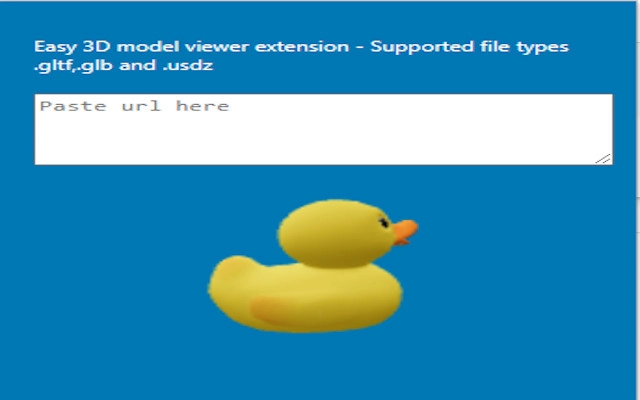
The user interface is minimal and focused on functionality. The extension integrates directly into the browser’s interface, typically appearing as an icon in the toolbar. When activated, it provides a simple input field to paste the URL of a 3D model file. Upon submission, the model is rendered in a lightweight viewer embedded within the browser tab.
Navigational flow is straightforward: paste URL → confirm → view model. The workflow is designed for speed and ease of use, especially beneficial in fast-paced design or development environments. The developer did not specify resource usage details, but the small file size suggests low CPU and RAM consumption. Performance observations are based on general software behavior patterns.
Stability is expected to be consistent given the lightweight nature of the tool and its focused scope. No reported issues with crashes or freezes were mentioned. The extension appears to operate reliably within the constraints of standard browser environments, though exact performance under heavy loads was not disclosed.
Compatibility & System Requirements
The software is compatible with Windows and Mac operating systems, supporting both desktop platforms. It functions as a browser extension, meaning it requires a modern web browser with extension support. The software version is 1.0.0, and the installation size is 1.2 MB.
Exact system requirements were not listed. Compatibility information was partially provided, indicating support for major desktop operating systems. The developer did not specify minimum browser versions or hardware specifications. Users are advised to ensure their browser is up to date to maintain full functionality.
Pros and Cons
Pros
- Instant 3D model viewing without external software
- Supports widely used 3D formats: GLTF, GLB, USDZ
- Lightweight and fast, only 1.2 MB in size
- Easy to use with minimal setup
- Free to download and use
Cons
- No advanced editing or manipulation features
- Limited to viewing; no export or annotation tools
- Dependent on browser and internet connection
- Exact system requirements not disclosed
- Only available as a browser extension, not a standalone desktop app
FAQ Section
Is the extension compatible with all web browsers?
The extension is designed for modern browsers with extension support. Specific browser compatibility was not detailed by the developer.
Is the software safe to use?
The extension is free and developed by Zenith Clipping. It operates within the browser’s security model, but users should only install extensions from trusted sources.
How often is the software updated?
The release date is April 15, 2024. No information was provided about update frequency or future development plans.
Can I use this tool offline?
Offline usage is not supported, as the extension requires an internet connection to load 3D model files from URLs.
What file formats does it support?
The extension supports .gltf, .glb, and .usdz formats, which are standard for web-based 3D content.
Final Thoughts & CTA
This browser extension offers a focused and efficient solution for viewing 3D models directly in the browser. Its ability to instantly render .gltf, .glb, and .usdz files without additional software makes it a valuable tool for designers, developers, and content creators who prioritize speed and simplicity. While it lacks advanced features like editing or export, its core purpose is fulfilled with precision.
Given its lightweight nature, free availability, and compatibility with Windows and Mac, it stands out as a practical utility for professionals working with 3D assets in web environments. The lack of detailed system requirements or update history is a minor limitation, but the tool remains reliable for its intended use.
Download Instant 3D Model Preview Tool now to streamline your 3D workflow and view models instantly.







